DOWNLOAD CINO
Just a few taps away from making group payments a breeze.
QR code to download the Cino app

TRACK EVERY
CASH PAYMENT, FREE

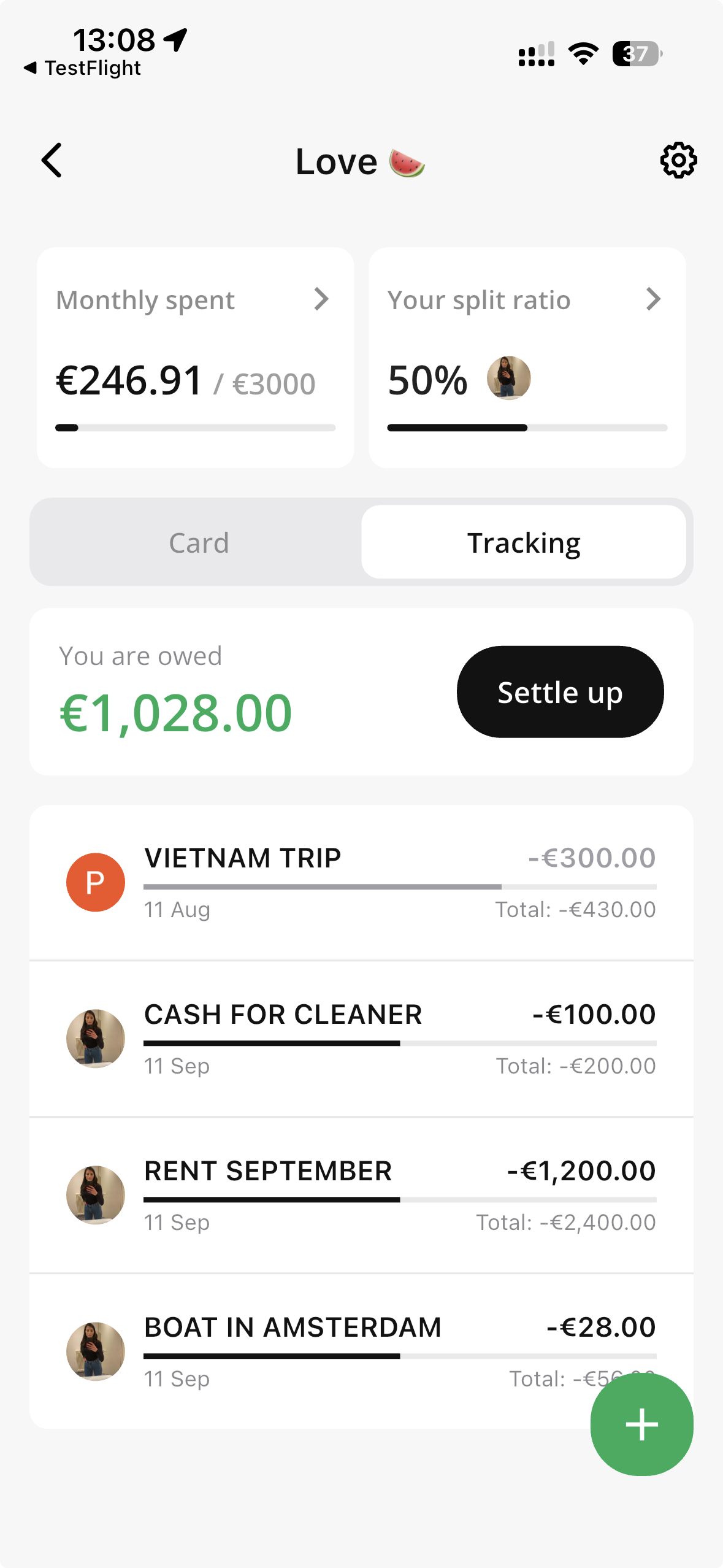
Log cash payments and manual splits
right alongside your automatic card expenses.
Log cash payments and manual splits
right alongside your automatic card expenses.
Completely free
No limits,
no transaction caps
Works for
groups of 2–8
Lighthouse logoPress or partner logoSifted logoTech.eu logoPress or partner logoPress or partner logo

Log anything in 2 taps

Free, unlimited tracking for everything that doesn't go through your Cino card — cash, bank transfers, or a bill you covered another way. Log it in seconds, right alongside your card splits.

1. Add it

Paid cash or covered something? Add it next to your already split payments
Cino shared card added to Apple Pay and Google Pay
Split ratio set to 50/50 between two partners in Cino

2. Split it

Choose who owes what — evenly, by percentage, or an exact amount.

3. Settle up

Whenever you are ready you can settle uo with your partner or friends.
Settling up happens is not linked to the Cino Card.

Shared Cino card with a tracked expense

PEOPLE ARE
LOVING CINO

5 out of 5 star rating
Cino is exactly what me and my girlfriend needed. We were always sending money back and forth after transactions. This has taken away the awkwardness of who will pay and then trying to send each other money
Emma • Email
5 out of 5 star rating
Great app, easily able to split bills automatically with friends and family!
Shane • App Store
5 out of 5 star rating
I love that I do not have to do anything after I pay. I've tried multiple apps to manage expenses, but with Cino everything's instant!
Lara • Email
5 out of 5 star rating
Love how Cino automates all the tedious tasks and gets rid of the mental gymnastics of splitting bills.
Hiro • Google Play
Paying with a shared Cino card, no top up needed

Completely free. No limits.

Tracking costs nothing — no per-transaction fee, no cap, no subscription. Log as many cash payments and manual expenses as you like, for free.
Get the app

Join
300k+ people
already splitting with Cino

Couples, friends and housemates share expenses with Cino.

5M

Bills split

and counting

33

Countries

and growing

3 MIN

To set up

Tracking vs a spreadsheet

Why manual trackers beat a notes app, a spreadsheet, or Splitwise

Spreadsheet / Splitwise

Cino Tracking

Only tracking but no actual payments

✅ Takes seconds, right inside your group

Splitwise Pro charges a subscription for extra features

✅ Completely free, no premium tier, no limits

Lives separately from your actual card splits

✅ Sits right next to your Cino Card splits

Easy to lose track of who's actually paid

✅ Everyone sees exactly what's owed

Only works if everyone remembers to check it

✅ Built right into the split group you already use

Tracking is perfect for

Anyone who pays cash or covers a friend, without a spreadsheet.

Couple sharing expenses with Cino instead of a joint bank account

Couples

Splitting rent, groceries or a cash takeaway — log it in Tracking and it sits right next to your card splits.

Friends splitting a bill with a shared Cino card

Friends

Someone covered the round in cash? Add it to Tracking in a couple of taps so nobody forgets.

Housemates sharing bills with Cino

Big Groups

Works for groups of 2 to 8. Every cash payment and manual expense is logged in one place, for everyone to see.

Featured articles

More on splitting bills, cash payments, and group expenses.

TRACK EVERYTHING
FREE, FOREVER 
Free. Simple. No limits.
Download nowDownload now
FAQ

What is Tracking, and when should I use it instead of Card?

Tracking is for anything that doesn't go through your Cino card — cash payments, a bill someone already paid another way, or an expense split outside Cino. Log it in Tracking and it shows up right alongside your automatic card splits, in the same group. Use Card when you're paying with your shared Cino card. Use Tracking for everything else — cash, bank transfers, or anything you're adding after the fact.

Is Tracking really free, with no limits?

Tracking costs nothing — no per-transaction fee, no cap, no subscription.

That's different from Card, which costs €0.20 per transaction, capped at €5 a month. Log as many cash payments and manual expenses as you like, completely free.

Does Tracking work for groups of any size?

Tracking works for groups of 2 to 8 people. Everyone in the group can see exactly what's owed, so there's nothing to chase.

Can I split a tracked expense by percentage or an exact amount?

Yes. When you add an expense in Tracking, choose how it's split: evenly between everyone, by percentage, or by an exact amount per person — whatever matches how you actually split the bill.

Is Cino itself free to use?

Tracking is completely free, with no limits.

Pay as you go. Card splits cost €0.20 per transaction, capped at €5 a month — after that, every card transaction is free for the rest of the month. No subscription either way.

Follow us for the latest updates
TikTokInstagramLinkedInYouTubeX (formerly Twitter)
Cino Mastercard debit cards are issued by our partner Checkout SAS, a financial institution and a Mastercard Principal Member
© 2026 Cino
· Privacy Policy · Terms and Conditions
By clicking “Accept All Cookies”, you agree to the storing of cookies on your device to enhance site navigation, analyze site usage, and assist in our marketing efforts. View our Privacy Policy for more information.